Break Down Big Tasks Into Manageable Steps
Create subtasks to decompose complex work. Use AI to automatically generate subtasks, track progress visually, and never lose sight of the details.

Available on iPhone, iPad, and Mac • Free plan available
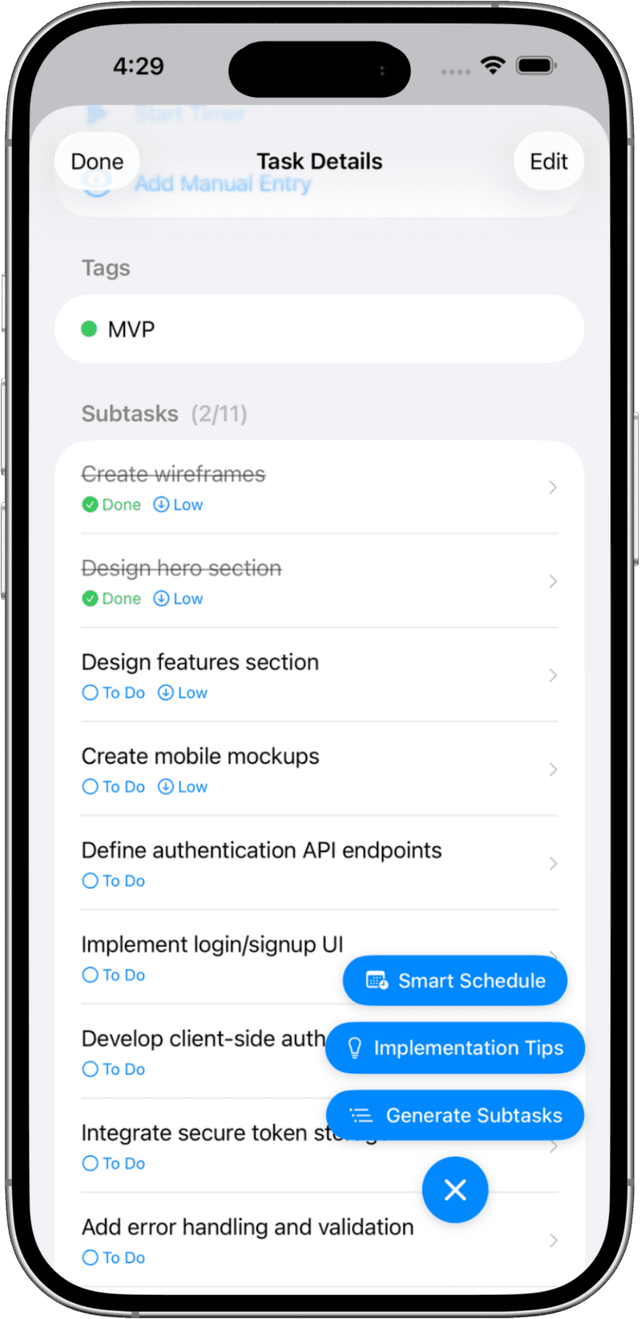
AI-Powered Task Breakdown
Solocrafter's AI can analyze your task description and automatically suggest subtasks. Break down any complex project in seconds.
- AI generates relevant subtasks from task descriptions
- Create unlimited subtasks manually
- Visual progress bar shows completion status
- Drag and drop to reorder priorities
Why Break Down Tasks?
Complex tasks become manageable when broken into smaller steps
Reduce Overwhelm
Large tasks can feel paralyzing. Breaking them into subtasks makes getting started easier and progress more visible.
Track Granular Progress
See exactly how far along you are. The progress bar updates as you complete each subtask, giving you momentum.
Clarify Next Actions
Always know what to do next. Subtasks create a clear sequence of actions instead of one ambiguous task.
AI Does the Thinking
Let AI analyze your task and suggest subtasks. Save time on planning and get straight to execution.
Perfect for Complex Work
Project Planning
Break down project milestones into actionable steps. Track progress across complex deliverables.
Learning Goals
Break courses into lessons and modules. Track your learning progress step by step.
Content Production
Break content pieces into research, writing, editing, and publishing steps.
Frequently Asked Questions
How do I create subtasks in Solocrafter?
Open any task and tap the subtasks section. You can add subtasks manually or use the AI button to generate subtasks automatically based on your task description.
Can AI generate subtasks for me?
Yes! Solocrafter includes AI-powered subtask generation. Just tap the AI button and the AI will analyze your task and suggest relevant subtasks to break it down.
Is there a limit to how many subtasks I can create?
Premium users can create unlimited subtasks. Free users can create up to 3 subtasks per task.
Can I reorder subtasks?
Yes, you can drag and drop subtasks to reorder them. Prioritize what needs to be done first.
Start Breaking Down Tasks Today
Make complex work manageable with AI-powered subtasks

Free plan includes subtasks • No credit card required