Create Tasks from Anywhere
Browsing an article? Reading an email? Found something to remember? Tap Share and send it directly to Solocrafter as a new task.

Available on iPhone, iPad, and Mac
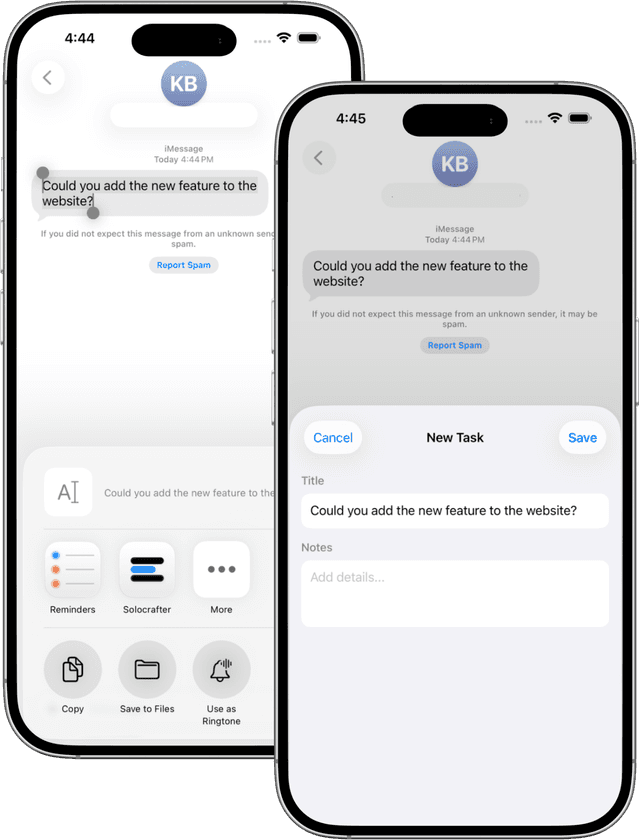
Quick Capture, Zero Friction
The Share Extension lets you capture tasks without switching apps. Found something worth doing? Share it to Solocrafter in seconds.
- Share from Safari, Mail, Notes, and more
- URLs get automatic preview cards
- Add notes and assign to projects instantly
- Works on iPhone, iPad, and Mac
Capture Without Context Switching
Don't lose your flow. Capture tasks instantly and get back to what you were doing.
Rich Link Previews
Share a URL and Solocrafter fetches the title, description, and image. Your tasks look beautiful and informative.
Instant Creation
Two taps to create a task. Share, select Solocrafter, done. No forms to fill, no friction.
Share Any Content
URLs, text selections, images, PDFs. If an app can share it, Solocrafter can capture it.
Mac Support
Works in macOS too. Share from Safari, Mail, or any app with share support on your Mac.
Perfect for Quick Capture Workflows
Research
Save articles, papers, and resources as tasks to review later. Build a reading list effortlessly.
Email Follow-ups
Share important emails directly to your task list. Never forget to follow up on a message.
Content Ideas
Capture inspiration as you browse. Share articles, tweets, and posts as content ideas.
Frequently Asked Questions
How do I use the Share Extension?
Tap the Share button in any app (Safari, Mail, Notes, etc.), then select Solocrafter from the share sheet. A new task will be created with the shared content.
What can I share to Solocrafter?
You can share URLs, text, images, and content from virtually any app that supports iOS/macOS sharing. Shared URLs get automatic preview cards.
Does the Share Extension work on Mac?
Yes! The Share Extension is available on both iOS/iPadOS and macOS. Share content from Safari, Mail, or any Mac app with share support.
How do I enable the Share Extension?
After installing Solocrafter, the Share Extension is automatically available. Just tap Share in any app and look for Solocrafter in the list.
Capture Tasks from Anywhere
Install Solocrafter and start sharing content to your task list

Share Extension included free • No credit card required